How Data Recovery Works: A Comprehensive Guide to Retrieving Lost Files
Data loss is a distressing experience that can affect anyone, from individual users to large corporations. Whether due to accidental deletion, hardware failure, or a malicious cyberattack, the disappearance of critical files can disrupt business operations and cause significant personal stress. Fortunately, data recovery—the process of salvaging inaccessible, lost, corrupted, or formatted data from storage devices—can often come to the rescue. This guide provides a thorough exploration of how data recovery works, detailing the underlying principles, the different techniques used for various types of failures, and the crucial steps you can take to improve your chances of a successful recovery.
The Fundamental Principle of Data Recovery
At its core, data recovery relies on a simple but powerful concept: when you delete a file or format a drive, the data is not immediately erased from the physical storage medium. Instead, the operating system simply marks the space occupied by that file as "available" for new data. The actual bits and bytes of the file remain intact on the disk until that specific space is overwritten by new information .

This is why the single most important rule following data loss is to stop using the affected device immediately. Continuing to save new files, install programs, or even run the operating system risks overwriting the very data you're trying to save, making its recovery impossible.
The Two Main Types of Data Loss and How Recovery Addresses Them
Data loss scenarios are generally categorized into two main types: logical failures and physical failures. The approach to how data recovery works differs significantly depending on which type you are facing.

1. Logical Failures and Software-Based Recovery
Logical failures occur when the physical storage device is healthy, but the data has become inaccessible due to issues with the software, file system, or user operation. Common causes include:
Accidental Deletion: Mistakenly deleting files and emptying the Recycle Bin.
Formatting: Accidentally formatting a partition or drive.
File System Corruption: Corruption of the file system structure (e.g., NTFS, FAT32) due to power outages, system crashes, or improper ejection.
Virus and Ransomware Attacks: Malicious software that corrupts, hides, or encrypts files.
How Recovery Works for Logical Failures:
The primary tool for logical recovery is specialized software. The process typically involves two levels of scanning:
Quick Scan: The software first performs a fast scan of the file system's index—such as the Master File Table (MFT) in NTFS—to locate files that have been marked for deletion but whose data remains largely intact. This method can often recover files with their original filenames and folder structures.
Deep Scan (RAW Recovery): If the file system is severely damaged or the drive is recognized as "RAW," a quick scan will be ineffective. In these cases, the software initiates a deep scan. This process ignores the corrupted file system and performs a sector-by-sector scan of the entire drive, searching for recognizable file signatures (like the header of a JPEG or DOCX file).
While powerful, a deep scan is time-consuming and often recovers files without their original names or folder hierarchy. The software will typically categorize them by file type, requiring you to manually sift through the results to find what you need.
2. Physical Failures and Hardware-Based Recovery
Physical failures involve damage to the hardware components of the storage device itself. Symptoms include:
A drive that is not detected by the computer at all.
Unusual noises like clicking, grinding, or buzzing.
Visible damage from water, fire, or impact.
How Recovery Works for Physical Failures:
This scenario requires the intervention of a professional data recovery service, as it involves physical repair. The process is far more complex and costly.
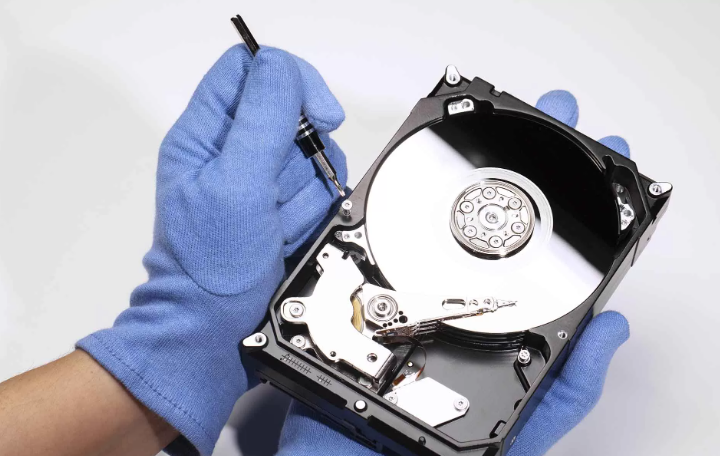
Diagnosis and Repair: Technicians first diagnose the exact component that has failed, which could be the printed circuit board (PCB), read/write heads, or the motor. For hard disk drives (HDDs), these repairs are performed in a Class 100 ISO 5 Cleanroom—a sterile environment free of dust particles that could destroy the delicate platters inside the drive -1.
Imaging the Drive: Once the drive is temporarily repaired enough to function, technicians use specialized hardware tools to create a sector-by-sector clone or image of the drive onto a stable, healthy medium. All recovery efforts are then performed on this image to avoid further stressing the original damaged device.
Logical Recovery on the Image: After a successful image is created, the experts use advanced software techniques (like those for logical recovery) to extract the data from the image file.
Advanced Recovery Scenarios
Beyond simple logical and physical cases, there are more complex data recovery environments.
RAID Recovery: Recovering data from a failed RAID array adds layers of complexity. Technicians must not only repair or image individual member drives but also virtually reconstruct the array. This requires determining the correct RAID level (e.g., 0, 1, 5, 10), stripe size, and disk order before the original data structure can be reassembled -9.
Solid-State Drive (SSD) Recovery: SSDs present unique challenges due to features like TRIM and wear-leveling. The TRIM command, designed to improve SSD performance and longevity, informs the drive which data blocks are no longer in use, allowing the drive to erase them internally. This can make traditional recovery of deleted files nearly impossible if TRIM has been executed. Recovery from SSDs often requires advanced chip-off techniques, which involve physically desoldering the NAND flash memory chips and reading them directly with specialized hardware.
A Step-by-Step Guide to the Data Recovery Process
For a user attempting logical recovery with software, the process is generally straightforward.
Download and Install the Software: Crucially, install the recovery software on a different drive than the one you are recovering from to avoid overwriting data.
Select and Scan the Target Drive: Launch the software and select the drive or partition from which you lost data. Start with a "Quick Scan" and, if that doesn't yield the needed results, proceed to a "Deep Scan" or "RAW Recovery".
Preview and Recover Files: Once the scan is complete, the software will display a list of recoverable files. Use the preview function (if available) to verify the integrity of important files before recovery. Finally, select the files you want and save them to a safe location—again, never the same drive they were recovered from.
Proactive Protection: Preventing the Need for Data Recovery
While understanding how data recovery works is valuable, preventing data loss in the first place is the best strategy. The most effective method is a robust backup regimen.
Follow the 3-2-1 Backup Rule: Keep at least three copies of your data, on two different types of media (e.g., an external hard drive and cloud storage), with one copy stored off-site.
Use Reliable Hardware and Surge Protectors: Protect your equipment from power surges and physical damage.
Employ Robust Cybersecurity Measures: Use firewalls and antivirus software to guard against malware and ransomware.
Conclusion
Data recovery is a powerful blend of digital archaeology and precision engineering. It works by leveraging the fact that digital data often persists on storage media long after it has been logically dismissed by the operating system. Whether through sophisticated software that combs through disk sectors or the meticulous physical repair of damaged hardware in a cleanroom, the process is designed to give your valuable data a second chance. By understanding the principles behind how data recovery works, you can act quickly and correctly when data loss occurs, dramatically increasing the likelihood that your files will be successfully returned to you.